Any command
Tests, lint, type checks, a Playwright suite: up to 20 per repository, each run in its folder after the setup script, with its variables and secrets.
AOSplaneProductQA
QA runs your repository’s own checks on every try, in the task’s private sandbox. Anything that fails goes back to the agent with the end of its output, and a draft pull request opens only once every check passes.
The agent is planning the change.
Try1/3
QA checksacme/apiat 3f2a91cExample
typecheckpnpm run typecheck–lintpnpm run lint–testpnpm run test–Waits for review. QA runs every check once the reviewer approves.
Running 3 checks at 3f2a91c in the task’s sandbox
$ pnpm run typecheck
> acme-api@1.4.0 typecheck
> tsc --noEmit
test exited 1the end of its output, sent to the engineer
 FAIL  src/limits.test.ts > resets after 60s
AssertionError: expected 429 to be 200
 › src/limits.test.ts:42:24
      Tests  1 failed | 63 passed (64)
Pull requestGate deciding
Add rate limits to the public API
Engineer: 2 tries (try 1 went back after QA failed test).
QA: 0 of 3 checks passed, run by the sandbox itself at 9c41e07.
How QA works
A try is one round: build, review, QA, gate. A review or a gate that asks for changes, or a failing check, sends the work back for the next try, up to the number of tries you pick.
01
Your agent plans the change. With Plan first, the product manager writes a Spec and you approve it before any code.
02
The engineer writes the change in the task’s private sandbox and commits it.
03
A review reads the commit. If it asks for changes, the work goes back.
04Proof
Every check runs on that commit. Exit 0 passes; anything else goes back with its output.
05
The final call. Its approval opens a draft pull request with the proof in it.
Your checks
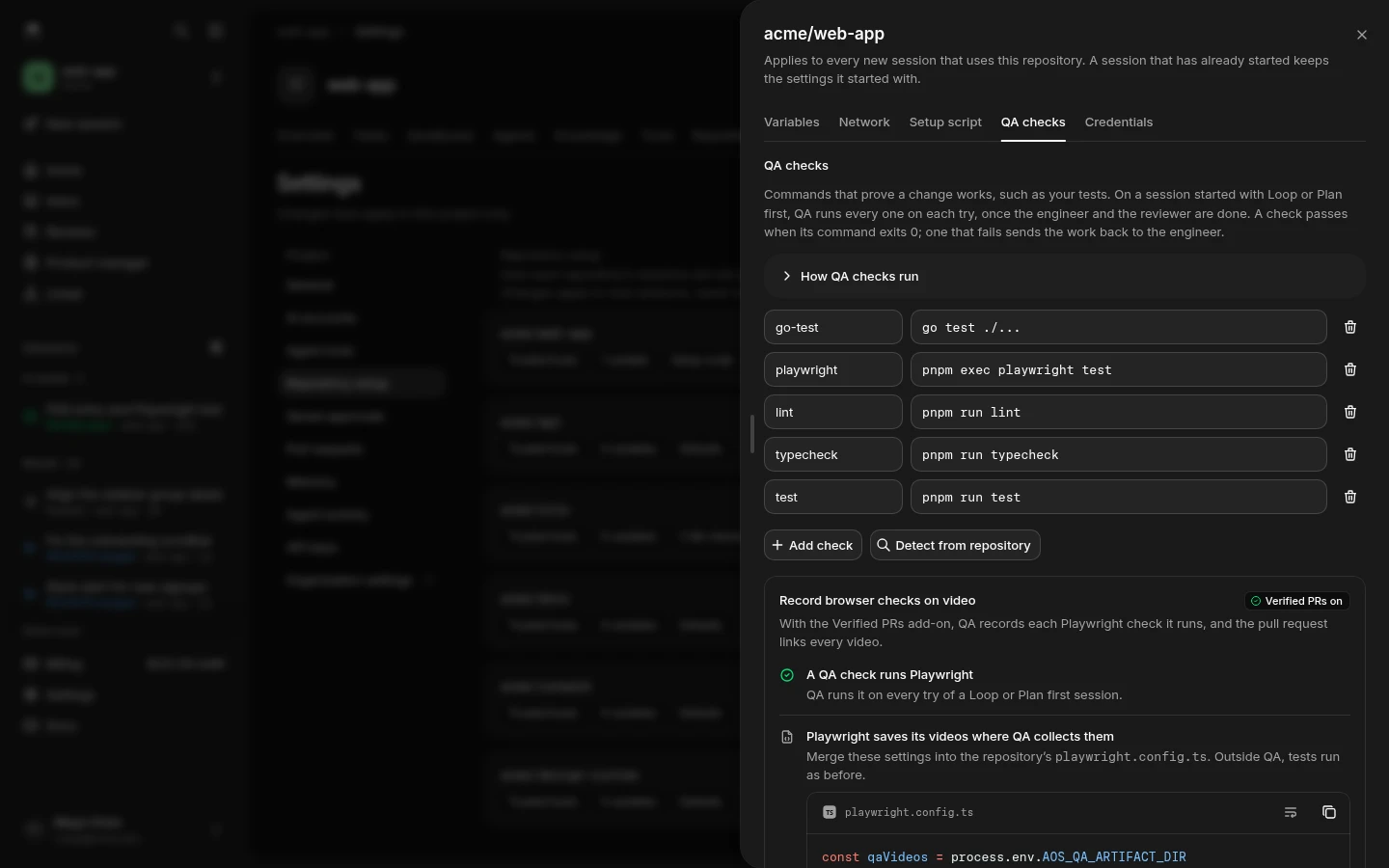
QA checks live in Repository setup › QA checks: the commands that prove a change works, such as your tests. A check passes when its command exits 0.
Tests, lint, type checks, a Playwright suite: up to 20 per repository, each run in its folder after the setup script, with its variables and secrets.
Detect from repository reads your default branch through the GitHub App, without cloning, and proposes checks from package.json, a Playwright config, go.mod or pytest.
Each check runs with bash -eo pipefail and its exit code is the verdict. An agent saying the tests pass doesn’t count.
Checks keep running after one fails, so the engineer hears about every failure in one go, not one try at a time.
A failing check goes back with its command and the last 200 lines of its output, with secrets scrubbed first.
A session keeps the checks it started with. Edits in Repository setup apply to the sessions you start next.
The proof
The engineer fixes what actually failed, from the check’s own output. And the pull request you review says how the change was proven, try by try.
Verifier test failed (exit 1): pnpm run test
… the end of its output
 ✓ src/keys.test.ts (8 tests) 121ms
 ✓ src/billing.test.ts (11 tests) 187ms
 ✓ src/auth.test.ts (14 tests) 212ms
 ✓ src/routes.test.ts (22 tests) 340ms
 › src/limits.test.ts (9 tests | 1 failed) 98ms
   × resets after 60s

 FAIL  src/limits.test.ts > resets after 60s
AssertionError: expected 429 to be 200

 › src/limits.test.ts:42:24
     41|     const res = await hit(app)
     42|     expect(res.status).toBe(200)
       |                        ^

 Test Files  1 failed | 11 passed (12)
      Tests  1 failed | 63 passed (64)
The failing check’s command and the last 200 lines of its output, secrets scrubbed. If more than one fails, it hears about all of them.
Add rate limits to the public API
Limits each API key to 100 requests a minute and answers 429 with a Retry-After header past it.
How AOSplane built it
test); this pull request is commit 9c41e07.Repository checks
pnpm run typecheck passedpnpm run lint passedpnpm run test passedWritten into the draft pull request when the gate approves: every try, what sent it back, and each check QA ran on that commit.
When to start
Both modes that run QA need at least one QA check on the repository. Without one, the composer offers a link to add them.
Up to 3 tries
Each try is one round: the agent builds and reviews the change, then QA runs the checks. If the last try still fails, the session stops without a pull request.
Video
With the Verified PRs add-on, QA records each Playwright check it runs, and the pull request links every video. The verdict is still the exit code: a recording only shows it.
pnpm exec playwright test, or detect it from the repository.playwright.config.ts. Outside QA, tests run as before.playwright.config.tsconst qaVideos = process.env.AOS_QA_ARTIFACT_DIR
export default defineConfig({
outputDir: qaVideos ?? "test-results",
use: {
video: qaVideos ? "on" : "retain-on-failure",
launchOptions: {
executablePath: process.env.CHROMIUM_PATH || undefined,
},
},
})CHROMIUM_PATH set to /usr/bin/chromium.npx playwright install ffmpeg, after the dependencies install.cdn.playwright.dev and its mirror, where the network is limited.Repository setup › QA checks ticks each step off as your settings cover it, and does three of them in one click.
pnpm run test passedpnpm exec playwright test passed Recorded on videoTurn off “Attach recordings to pull requests” and the videos stay on the session.
In the console
Add checks by hand or detect them from the repository. A session started with Loop until checks pass, or Plan first, runs every one on each try.
Questions
Still curious? Email us and a person will answer.
No. QA runs the commands you listed, in the task’s own sandbox, and reads their exit codes: 0 passes, anything else fails. An agent saying the tests pass is never taken as proof.
The session stops without a pull request and says why, for example “QA failed on the last round.” You pick from 1 to 5 tries when you start a task; 3 is the default.
Tasks started with Loop until checks pass, or with Plan first, then wait for approval. Start now runs the agent on its own. Both modes need at least one QA check on the repository, and the composer links you to Repository setup if it has none.
Yes. A check is any command, so a Playwright suite runs like your unit tests. With the Verified PRs add-on, on paid plans, QA also records those browser checks on video, failures included, and the pull request links each one.
Checks run inside the task’s sandbox, so their time is part of its runtime, billed by the second like the rest of the task. Building, reviewing and the gate run on your own AI account. Video is the Verified PRs add-on.
The rest of the team
QA proves the work. The product manager plans it, and code review reads every pull request.
Get started
Connect your AI account, add your test command in Repository setup, and start a task with Loop until checks pass. The free plan is ready in minutes.
Read the quickstart